30. 11. 2020
Create a visualization of your room with Fortelock flooring
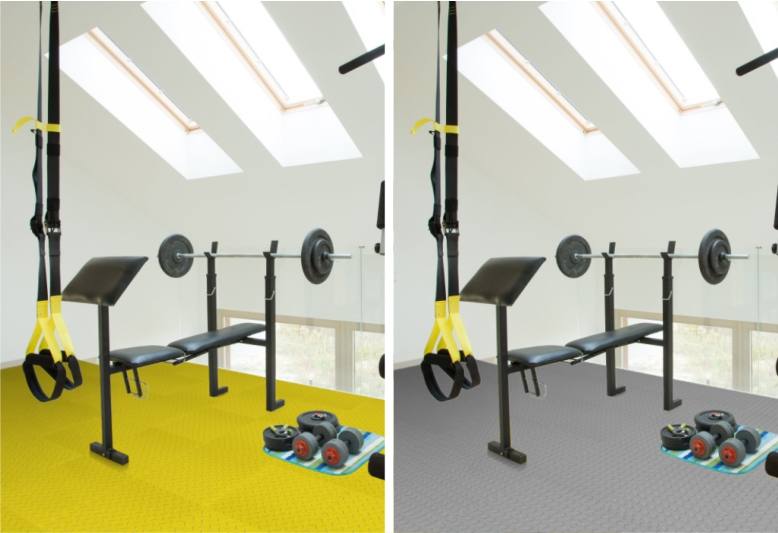
Dear customers,
we have launched a new visualizer that lets you create a visualization of your room with Fortelock flooring in just a few clicks. Upload a photo of your room to the visualizer and then change the Fortelock floor to match your taste and wishes.
Go to the visualizer
What to do after the visualisation
Once you have chosen the colour and type of tiles, enter the room dimensions into the configurator, which will calculate the minimum number of tiles needed. The calculator on the product pages can add an extra 5% for offcuts. You can check the actual shade and surface on an 8 × 8 cm sample, which you can order using the form. If you want to try the floor directly in your facility, Fortemix lends up to 5 m² of tiles for one month. Bear in mind that colour cannot be 100% guaranteed, especially between individual production batches.
Frequently asked questions
How does the Fortelock floor visualiser work?


The visualiser is an online tool into which you upload a photo of your room. You can then change the colour of the Fortelock floor in the photo and compare how the different options would look in your space. You do not need to install anything or order samples in advance.
What colours and decors does Fortelock flooring come in?
Industry, Industry Ultra, Invisible and XL are made in Black, Blue, Graphite, Green, Grey, Rosso Red and Yellow, and the ECO Classic versions in Black, Blue, Brown, Graphite and Grey. The ESD ranges have five ESD shades, and the Business design range has seven designer decors with a Graphite joint.
How can I check the floor colour in real life?
Order an 8 × 8 cm tile sample. Photos and screens distort colours, whereas a sample shows the real shade and the surface texture. However, colour cannot be 100% guaranteed, especially between batches, and a difference in shade between the sample and the floor is not grounds for a claim. You can order a sample on the tile sample page.
How do I work out how many tiles to order for a room?
Use the configurator, which calculates the minimum quantity needed from the room dimensions and selected parameters. As a guide: Industry and Industry Ultra need 4 tiles per m², Invisible 5 tiles and XL 2.5 tiles. It is sensible to add approximately 5% for offcuts.
Can a Fortelock floor be personalised with a logo or custom graphics?
Yes, with the tile printing service. The CUSTOM option prints your own graphics supplied as vector curves or at 300 dpi, typically logos, warning symbols, direction signs and photographs. The GRANIT option offers three standard speckled patterns that visually liven up a uniform surface.